
Microsoft Office Training Classes in Gilbert, Arizona
Learn Microsoft Office in Gilbert, Arizona and surrounding areas via our hands-on, expert led courses. All of our classes either are offered on an onsite, online or public instructor led basis. Here is a list of our current Microsoft Office related training offerings in Gilbert, Arizona: Microsoft Office Training
Microsoft Office Training Catalog
subcategories
Business Analysis Classes
Course Directory [training on all levels]
- .NET Classes
- Agile/Scrum Classes
- AI Classes
- Ajax Classes
- Android and iPhone Programming Classes
- Azure Classes
- Blaze Advisor Classes
- C Programming Classes
- C# Programming Classes
- C++ Programming Classes
- Cisco Classes
- Cloud Classes
- CompTIA Classes
- Crystal Reports Classes
- Data Classes
- Design Patterns Classes
- DevOps Classes
- Foundations of Web Design & Web Authoring Classes
- Git, Jira, Wicket, Gradle, Tableau Classes
- IBM Classes
- Java Programming Classes
- JBoss Administration Classes
- JUnit, TDD, CPTC, Web Penetration Classes
- Linux Unix Classes
- Machine Learning Classes
- Microsoft Classes
- Microsoft Development Classes
- Microsoft SQL Server Classes
- Microsoft Team Foundation Server Classes
- Microsoft Windows Server Classes
- Oracle, MySQL, Cassandra, Hadoop Database Classes
- Perl Programming Classes
- Python Programming Classes
- Ruby Programming Classes
- SAS Classes
- Security Classes
- SharePoint Classes
- SOA Classes
- Tcl, Awk, Bash, Shell Classes
- UML Classes
- VMWare Classes
- Web Development Classes
- Web Services Classes
- Weblogic Administration Classes
- XML Classes
- AWS Certified Machine Learning: Specialty (MLS-C01)
2 November, 2026 - 6 November, 2026 - DOCKER WITH KUBERNETES ADMINISTRATION
30 November, 2026 - 4 December, 2026 - RED HAT ENTERPRISE LINUX AUTOMATION WITH ANSIBLE
9 November, 2026 - 12 November, 2026 - RED HAT ENTERPRISE LINUX SYSTEMS ADMIN I
26 October, 2026 - 30 October, 2026 - OPENSHIFT ADMINISTRATION
19 October, 2026 - 21 October, 2026 - See our complete public course listing
Blog Entries publications that: entertain, make you think, offer insight
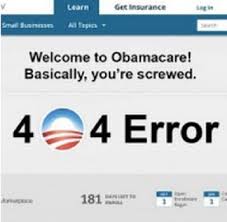 Millions of people experienced the frustration and failures of the Obamacare website when it first launched. Because the code for the back end is not open source, the exact technicalities of the initial failings are tricky to determine. Many curious programmers and web designers have had time to examine the open source coding on the front end, however, leading to reasonable conclusions about the nature of the overall difficulties.
Lack of End to End Collaboration
The website was developed with multiple contractors for the front-end and back-end functions. The site also needed to be integrated with insurance companies, IRS servers, Homeland Security servers, and the Department of Veterans Affairs, all of whom had their own legacy systems. The large number of parties involved and the complex nature of the various components naturally complicated the testing and integration of each portion of the project.
The errors displayed, and occasionally the lack thereof, indicated an absence of coordination between the parties developing the separate components. A failed sign up attempt, for instance, often resulted in a page that displayed the header but had no content or failure message. A look at end user requests revealed that the database was unavailable. Clearly, the coding for the front end did not include errors for failures on the back end.
Bloat and the Abundance of Minor Issues
Obviously, numerous bugs were also an issue. The system required users to create passwords that included numbers, for example, but failed to disclose that on the form and in subsequent failure messages, leaving users baffled. In another issue, one of the pages intended to ask users to please wait or call instead, but the message and the phone information were accidentally commented out in the code.
While the front-end design has been cleared of blame for the most serious failures, bloat in the code did contribute to the early difficulties users experienced. The site design was heavy with Javascript and CSS files, and it was peppered with small coding errors that became particularly troublesome when users faced bottlenecks in traffic. Frequent typos throughout the code proved to be an additional embarrassment and were another indication of a troubled development process.
NoSQL Database
The NoSQL database is intended to allow for scalability and flexibility in the architecture of projects that will use it. This made NoSQL a logical choice for the health insurance exchange website. The newness of the technology, however, means personnel with expertise can be elusive. Database-related missteps were more likely the result of a lack of experienced administrators than with the technology itself. The choice of the NoSQL database was thus another complication in the development, but did not itself cause the failures.
Another factor of consequence is that the website was built with both agile and waterfall methodology elements. With agile methods for the front end and the waterfall methodology for the back end, streamlining was naturally going to suffer further difficulties. The disparate contractors, varied methods of software development, and an unrealistically short project time line all contributed to the coding failures of the website.
F# is excellent for specialties such as scientific computing and data analysis. It is an excellent choice for enterprise development as well. There are a few great reasons why you should consider using F# for your next project.
Concise
F# is not cluttered up with coding noise; no pesky semicolons, curly brackets, and so on. You almost never have to specify the kind of object you're referencing because of its powerful type inference system. It usually takes fewer lines of code to solve the same issue.
Convenient
Common programming tasks are much easier in F#. These include generating and using state machines, comparison and equality, list processing, as well as complex type definitions. It is very easy to generate powerful and reusable code because functions are first class objects. This is done by creating functions that have other functions as parameters or that combine existing functions to generate a new functionality.
Correctness
F# has a strong type system, and, therefore, prevents many common errors such as null reference exceptions. Valuables are immutable by default which, too, prevents a huge class of errors. You can also encode business logic by utilizing the type system. When done correctly, it is impossible to mix up units of measure or to write incorrect code thereby decresing the need of unit tests.
Concurrency
F# has number of built-in libraries. These libraries help when more than one thing at a time is occurring. Parallelism and asynchronous programming are very simple. There is also a built-in actor model as well as excellent support for event handling and functional reactive programming. Sharing state and avoiding locks are much easier because data structures are immutable by default.
Completeness
F# also supports other styles that are not 100 percent pure. This makes it easier to interact with the non-pure world of databases, websites, other applications, and so on. It is actually designed as a hybrid functional/OO language. F# is also part of the .NET ecosystem. This gives you seamless access to all the third party .NET tools and libraries. It operates on most platforms. These platforms include Linux and smartphones via mono. Visual Studio is integrates with F# as well. This means you get many plug-ins for unit tests, a debugger, a IDE with IntelliSense support, other development tasks. You can use MonoDevelop IDE on Linux.
Related:
F# - Marching Towards Top 10 Programming Languages
What Are the Advantages of Python Over Ruby?
Top 10 Programming Languages Expected To Be In Demand in 2014
Not too long ago, Apple added something phenomenal to the iPhone OS: a dashboard screen. If you have a Macintosh computer, you may be familiar with the dashboard that is available (regularly) by pressing F4. Otherwise, you can draw similarities to your Windows 7 Dashboard on the right hand side of your desktop, that shows you updates on your applications and widgets you add to it. Finding your dashboard on your iPhone is just as easy: just put your finger on the top of your iPhone screen, and drag down.
Here, in your dashboard, you will see all of the updates that has been pushed into such by your applications that desire to send you messages: things like new text messages, new updates to your subscribed magazines, your messages on payment applications. If you have reviewed a message set by an application by tapping on it, that message will automatically become deleted. However, if you don’t desire to go into the application to delete it, simply tap in the top right on the bar that categorizes that particular application, and tap again to clear all of the messages set by that application, and clear up your dashboard.
But, your dashboard isn’t all about your application. You not only get your messages, but you get important information set by default applications, such as the weather. If you don’t feel like scouting out your weather application amidst all your applications you have downloaded, simply go into your dashboard, and find out the forecast for the whole week, just by a simple swipe. Not only that, tickers for your stocks are displayed near the bottom of the dashboard.
Unlike traditional online courses that charge a fee, limit enrollment and provide credit or certification, Moocs (massive open online courses) are usually free or low cost and can host hundreds of thousands global participants. Although MOOC have been around for years in the form of collective techie learning gatherings, participation in 2012 has ballooned at a rapid pace likened to FaceBook in its heyday. According to The Year of the MOOCarticle in the New YorkTimes, edX, a nonprofit start-up backed by Harvard and MIT, had 370,000 registrants in the fall of its first official courses. This paled in comparison to the amount of students that Courseraattained in its first year of online learning opportunities, 1.7 million!
Will MOOCs Replace education as we know it?
Like any new trend, massive participation in online classes has its challenges. Lynda Weinman has ample experience when pointing out that they are by no means a replacement for formal education. As a former digital animator, special effects designer and classroom college teacher, Linda paved the path for an earlier version of MOOC education in the mid 90’s when she founded Lynda.comas an aide to her own students. Over four million students and 2,200 courses later she’s confident when clarifying that many of the collegespartnered with Lynda.com use the tutorials as added features to their existing courses. When asked in an interview with ReadWriteBuilders, if high technical companies look at online programs in terms of advancement as a supplement to traditional education or as a way for people to further their careers, Lynda feels that “it’sjust one example of something that you can do to enhance your attractiveness to potential employers. But [it’s also important to have] a portfolio and body of work, references that actually work out, showing that you had success in the past.”
MOOC Benefits:
Tech Life in Arizona
| Company Name | City | Industry | Secondary Industry |
|---|---|---|---|
| Insight Enterprises, Inc. | Tempe | Computers and Electronics | IT and Network Services and Support |
| First Solar, Inc. | Tempe | Energy and Utilities | Alternative Energy Sources |
| Republic Services Inc | Phoenix | Energy and Utilities | Waste Management and Recycling |
| Pinnacle West Capital Corporation | Phoenix | Energy and Utilities | Gas and Electric Utilities |
| Amkor Technology, Inc. | Chandler | Computers and Electronics | Semiconductor and Microchip Manufacturing |
| Freeport-McMoRan Copper and Gold | Phoenix | Agriculture and Mining | Mining and Quarrying |
| US Airways Group, Inc. | Tempe | Travel, Recreation and Leisure | Passenger Airlines |
| PetSmart, Inc. | Phoenix | Retail | Retail Other |
| Avnet, Inc. | Phoenix | Computers and Electronics | Instruments and Controls |
| ON Semiconductor Corporation | Phoenix | Computers and Electronics | Semiconductor and Microchip Manufacturing |
training details locations, tags and why hsg
The Hartmann Software Group understands these issues and addresses them and others during any training engagement. Although no IT educational institution can guarantee career or application development success, HSG can get you closer to your goals at a far faster rate than self paced learning and, arguably, than the competition. Here are the reasons why we are so successful at teaching:
- Learn from the experts.
- We have provided software development and other IT related training to many major corporations in Arizona since 2002.
- Our educators have years of consulting and training experience; moreover, we require each trainer to have cross-discipline expertise i.e. be Java and .NET experts so that you get a broad understanding of how industry wide experts work and think.
- Discover tips and tricks about Microsoft Office programming
- Get your questions answered by easy to follow, organized Microsoft Office experts
- Get up to speed with vital Microsoft Office programming tools
- Save on travel expenses by learning right from your desk or home office. Enroll in an online instructor led class. Nearly all of our classes are offered in this way.
- Prepare to hit the ground running for a new job or a new position
- See the big picture and have the instructor fill in the gaps
- We teach with sophisticated learning tools and provide excellent supporting course material
- Books and course material are provided in advance
- Get a book of your choice from the HSG Store as a gift from us when you register for a class
- Gain a lot of practical skills in a short amount of time
- We teach what we know…software
- We care…